


Interactive digital signage is a display that responds to the person using it, usually through touch, but also through gestures, sensors, QR codes or voice. Unlike a standard screen that loops the same video, it lets customers choose what they see, whether that is a product catalogue, a store map, a menu or a booking form. For South African businesses, it turns a passive advertisement into a conversation that can capture leads, shorten queues and sell around the clock.
This guide explains how interactive displays work, the formats available, what to budget for, how to design them so that people can actually use them, and how to plan an installation in your premises.
What Is Interactive Digital Signage and How Does It Work?
Interactive digital signage combines a commercial-grade display, an input method and content software that reacts to what the viewer does. When a customer touches the screen or scans a code, the media player loads the matching page, video or form, then returns to an attract loop when nobody is using it.
Most systems have four layers:
- The display: a commercial panel rated for long operating hours, often with a touch overlay or built-in touch sensor.
- The media player: a small computer that runs the content and processes input.
- The software: a content management system, plus the interactive application itself.
- The connection: wired or mobile data for updates, analytics and remote monitoring.
The attract loop matters more than many businesses expect. A screen showing a still menu looks like a poster, so people walk past. A screen with moving content and a clear prompt such as "Touch to find your product" invites the first tap.
Interactive screens versus kiosks
A kiosk is a self-contained unit, usually freestanding, built for one task such as check-in, ordering or payments. An interactive display is a broader category that includes wall-mounted panels, window screens, tables and tall pylons. Every kiosk is a type of interactive signage, but not every interactive screen needs to be a kiosk. If you only need customers to browse, a wall-mounted touch panel is usually cheaper and easier to maintain than a full kiosk with printers and card readers.
Types of Interaction You Can Offer
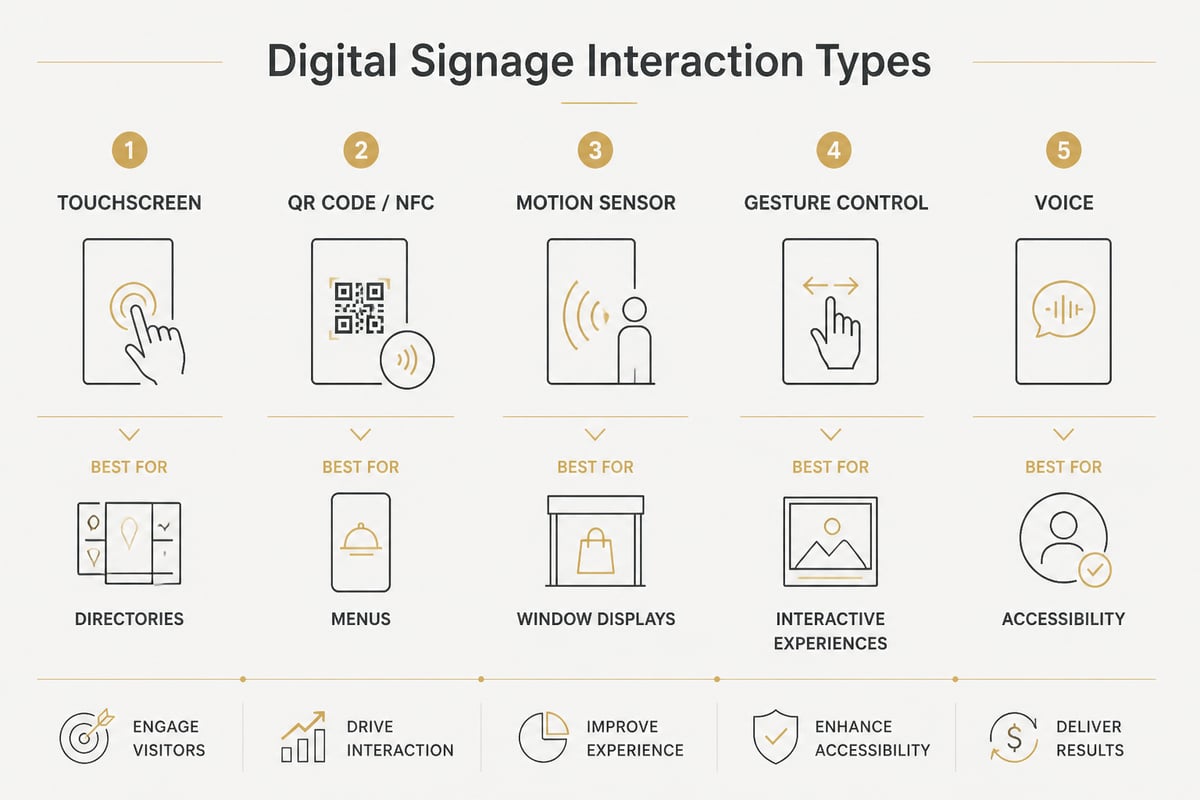
The right input method depends on where the screen sits and who uses it. Touch is the most common, but it is not the only option, and in some environments it is not the best one.
| Interaction type | How it works | Typical use |
|---|---|---|
| Touchscreen | Finger taps and swipes on the display | Directories, product browsers, ordering |
| QR code or NFC | Visitor scans with their own phone | Menus, promotions, contact capture |
| Motion or proximity sensor | Content changes when someone approaches | Window displays, entrance screens |
| Gesture control | Hand movements detected by a camera | Hygiene-sensitive or public spaces |
| Voice | Spoken commands | Accessibility, hands-free use |
QR codes deserve particular attention in South Africa. Many customers prefer using their own phone over touching a shared surface, and a code on a screen costs almost nothing to add. It also extends the interaction beyond the display: the shopper can continue browsing on their device long after leaving the shop floor.
Where Interactive Displays Earn Their Place
Interactive displays pay off where customers need information, choice or speed, and where staff time is limited. The best applications solve a specific problem rather than adding technology for its own sake.
- Retail: product finders, stock lookups, "endless aisle" catalogues showing items not on the shelf, and loyalty sign-ups.
- Shopping centres and office parks: wayfinding directories with tenant search and route maps.
- Restaurants and quick-service outlets: self-order screens that cut queue times and raise average order value.
- Showrooms and dealerships: vehicle or product configurators where customers choose colours, finishes and options.
- Healthcare, schools and corporate reception: visitor check-in, staff directories and appointment prompts.
- Events and exhibitions: lead capture, competitions and product demonstrations.
If your sign currently says "Ask inside for prices", an interactive screen can answer that question without a staff member leaving the counter. Signshoponline supplies interactive billboards and digital advertisement displays suited to these environments, from a single in-store panel to a multi-screen setup.
Interactive Digital Signage Hardware and Cost Considerations
The price of an interactive system is driven mainly by screen size, touch technology, enclosure and software, so a realistic budget starts with where the screen will live. A panel in a climate-controlled showroom costs far less than a sunlit outdoor unit that needs high brightness, weatherproofing and ventilation.
Consider these cost drivers:
- Screen size and brightness: larger and brighter displays cost more, and anything near windows or outdoors needs high-brightness panels to remain readable.
- Touch technology: infrared and projected capacitive overlays differ in accuracy, durability and price.
- Enclosure or mounting: wall brackets, freestanding stands and digital display pylons all carry different fabrication costs.
- Software and content: a template-based system is cheaper than a custom-built application.
- Connectivity: mobile data or fibre for remote updates and reporting.
- Power protection: load shedding is a reality for South African businesses, so budget for a UPS or surge protection to avoid corrupted players and abrupt shutdowns.
Ask for a full quote that separates hardware, installation, software licensing and ongoing support. A low screen price that excludes the media player and mounting rarely stays low.
Designing for People, Not Just for Pixels
An interactive screen succeeds when a first-time visitor can complete a task in under a minute without help. That means large targets, high contrast, short paths and accessible heights.
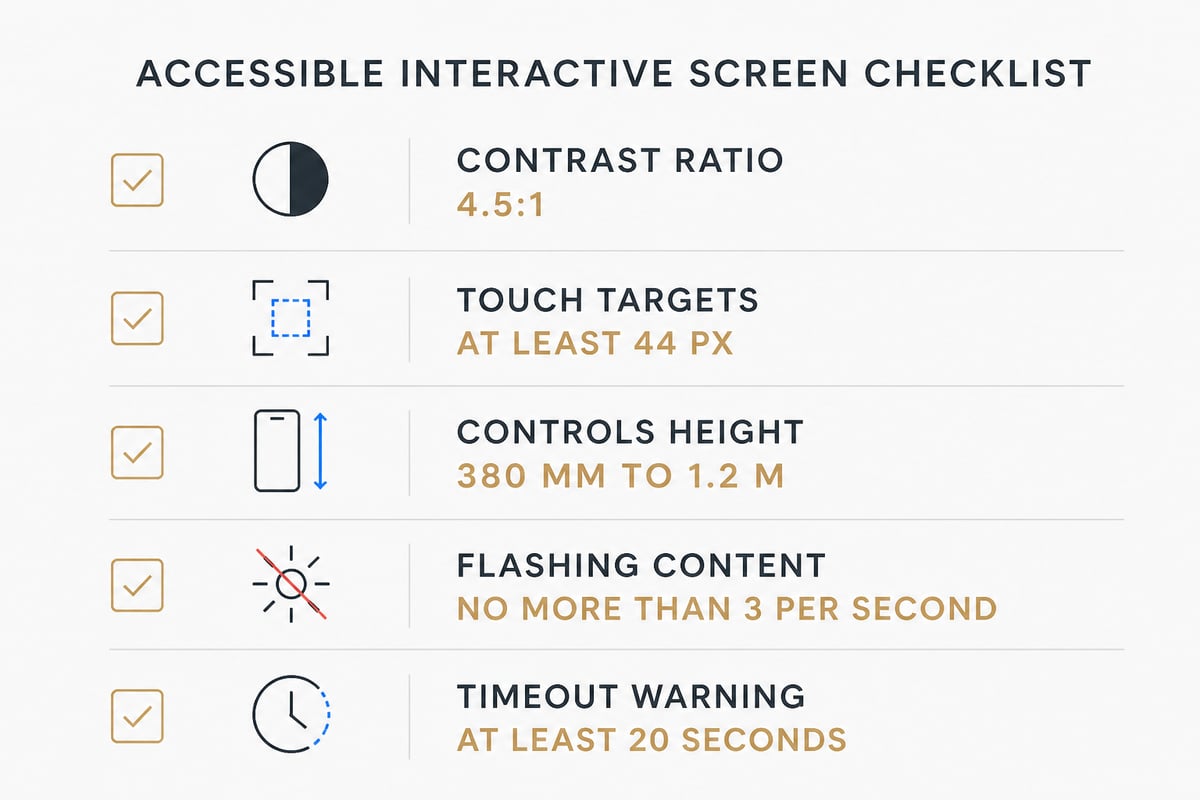
Evidence-based guidance exists for each of these. The WCAG 2.1 AA standard specifies a minimum contrast ratio of 4.5:1 for normal text and 3:1 for large text, which is a sensible benchmark for any screen read at arm's length. For touch, WCAG 2.2 sets a minimum target size of 24 × 24 CSS pixels, with 44 pixels or 10 mm cited as a common planning figure. In practice, bigger is better on a public screen where users may be wearing gloves, carrying bags or standing at an angle.
Practical design rules
- Keep menus to one level or two at most. Deep navigation causes abandonment.
- Put the primary action, such as "Start", in the centre of the attract screen.
- Use plain language and a clear "Home" button on every page.
- Limit flashing content. WCAG 2.3.1 caps it at no more than three flashes per second.
- Add a session timeout that resets the screen. The kiosk guidance recommends warning users at least 20 seconds before a timeout, letting them extend it, and clearing the session afterwards, which protects the privacy of anyone who entered personal details.
Physical placement is as important as the interface. The ADA reach range cited for kiosk controls is 15 to 48 inches above the floor, with a 30 × 48 inch clear floor space in front of the unit. Those are US figures, but they translate into a useful rule of thumb: roughly 380 mm to 1.2 m for controls, with enough clear space for a wheelchair user to approach. For further practical advice on captions, plain language, alternative input and physical access, the accessibility guidance for kiosks and interactive displays from Utah State University is a useful reference.
Accessibility and Compliance: Planning Ahead
Accessibility is moving from good practice to formal requirement in many markets, and businesses that supply or partner with international organisations should expect to be asked about it. Utah State University's standard, for instance, requires digital signage, kiosks and interactive displays to meet WCAG 2.1 Level AA. In the United States, the Department of Justice's Title II rule requires WCAG 2.1 AA for covered web content and mobile apps, with a deadline of 26 April 2027 for most public entities.
These rules do not bind a South African retailer directly. Even so, designing to WCAG AA from the start costs little, widens your audience and avoids an expensive redesign if a corporate client or franchisor later requires it. Guidance on readable signage text, contrast and avoiding rapidly changing content offers a quick checklist to review your layouts before launch.
Building the Content: Software and Workflow
Interactive content can be built with template-based software or a custom application, and the choice depends on how often it changes and how complex the journeys are. A restaurant updating menu prices weekly needs a simple editor that staff can use without a developer. A dealership with a vehicle configurator needs a custom build with a database behind it.
A sensible workflow looks like this:
- Define one primary goal, such as capturing leads, reducing queue time or helping people find a product.
- Map the shortest route a visitor would take to complete that goal.
- Build a prototype and test it with five people who have never seen it.
- Revise, then launch on one screen before rolling out to others.
- Review usage data monthly and update content on a schedule.
Printed materials still have a role alongside screens. High-quality large format digital prints and digital posters can frame the interactive unit, direct people towards it and keep your branding consistent across the premises.
Measuring Whether It Works
An interactive screen should be judged against the goal you set before installation, not against how impressive it looks. Because the software records every touch, you have more data than you would ever get from a printed sign.
Useful measures include:
- Engagement rate: the proportion of passers-by who start a session.
- Completion rate: how many sessions reach the intended end point, such as a submitted form.
- Drop-off pages: where users abandon the journey, which shows what to simplify.
- Dwell time: long sessions can signal interest or confusion, so read them alongside completion data.
- Conversions: coupon redemptions, sign-ups, orders or enquiries traced back to the screen.
Compare these figures month on month and adjust. A button that nobody presses is a design problem, not a customer problem.
Planning an Installation Across South African Premises
A successful rollout starts with a site assessment, because lighting, power, security and footfall differ between a Sandton showroom, a Durban beachfront shop and a Cape Town restaurant. Walk the space and ask where customers naturally pause, where the sun hits the glass and where a power point and data cable can realistically be reached.
Key checks before you order:
- Sunlight and glare: a bright window can wash out a standard panel.
- Security: public screens in high-traffic areas may need tamper-resistant enclosures and secure mounting.
- Power and backup: confirm outlets, and plan for outages.
- Cleaning: touch surfaces need regular wiping, so choose materials that tolerate it.
- Branding: the enclosure, surround and nearby signage should look like one system. Signshoponline's custom signage and illuminated signage can complete the look around the screen.
With over 20 years of experience in manufacturing, installation and design, Signshoponline advises on the best materials and production methods whether you need one unit or several hundred, and all its work is guaranteed. Its project management service can coordinate the fabrication, installation and handover so that you deal with one accountable team rather than several suppliers.
Frequently Asked Questions
Does interactive digital signage need an internet connection?
Not always. A touch application can run entirely from the media player's local storage, which suits locations with unreliable connectivity. A connection is only needed for live data, remote content updates, analytics and monitoring.
Do I need a developer to create the content?
Not for simple applications. Template-based software lets staff build menus, catalogues and forms without code. A developer is usually needed for custom configurators, integrations with stock or booking systems and bespoke animations.
Can an interactive screen work outdoors?
Yes, with the right hardware. Outdoor units need high-brightness panels, weather-rated enclosures and temperature control, so they cost more than indoor models. Shaded or covered positions reduce both glare and heat stress.
How long does an interactive display last?
Commercial-grade panels are built for long daily operating hours and typically last several years with regular cleaning and software updates. Lifespan depends on the environment, power quality and how consistently the unit is maintained.
Start by writing down the one task you want a screen to handle, such as answering product questions or taking orders, and note where in your premises customers pause. With that brief, you can ask for a realistic specification instead of a generic package. Get a quote from Signshoponline to discuss which interactive display, mounting and surrounding signage suit your site and budget.


